
Module 01Locked
C01 · 3D CAD Design: Solid & Class-A Surface Modelling
End-to-end VISI training in solid, surface and free-form modelling — from interface fundamentals to Class-A surfacing and tooling-ready CAD.
378h54 lessons3 levels
0% complete
LAB 02
16 industry-certified courses across Reverse Engineering, ADAS scenario simulation and Digital-Twin / CAE — VISI, VTD, MSC Adams, Simufact, MSC Marc, Actran, BricsCAD and more — delivered as VTU-aligned Beginner → Intermediate → Advanced tracks with graded lab assessments and OEM certifications.
Start here
Enrol to unlock 864 lessons across 16 modules.
Curriculum
End-to-end VISI training in solid, surface and free-form modelling — from interface fundamentals to Class-A surfacing and tooling-ready CAD.
0% complete
Master multi-CAD data exchange in VISI — loading, healing and validating CATIA, Pro-E/Creo and neutral formats for reliable downstream design, CAM and CAE.
0% complete
Transform 3D scan data into accurate, usable CAD — mesh preparation, feature-based and automatic surfacing, deviation control and inspection-grade output in VISI Reverse.
0% complete
Hands-on training on portable-arm, structured-light and CMM metrology — from safe hardware operation to inspection-grade scanning, CAD comparison and reporting.
0% complete
Practical additive-manufacturing training — AM processes, printer operation, slicing, design for AM, and an integrated reverse-engineering-to-print pipeline.
0% complete
From 2D drafting to full civil site and grading design in BricsCAD — drawing tools, 3D modelling, terrain, alignments, corridors and documentation.
0% complete
Process field-survey data into drawings, terrain models and infrastructure deliverables using E-Survey CADD Diamond — from data loading to road, canal and map production.
0% complete
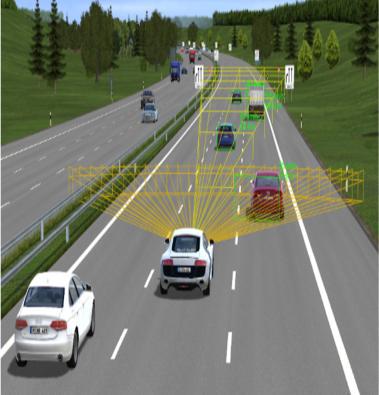
Build virtual roads, traffic and sensor scenarios in VTD to develop and validate ADAS functions — from toolchain basics to NCAP scenarios and SIL/HIL co-simulation.
0% complete
Build and deploy machine-learning and computer-vision models on NVIDIA Jetson edge hardware — from ML foundations to real-time ADAS-oriented perception.
0% complete
Set up and operate a driver-in-the-loop (DIL) simulator with vision monitoring — from rig assembly and telemetry to ADAS-in-the-loop validation and human-factors studies.
0% complete
Comprehensive DEP MeshWorks training for CAE model build — geometry cleanup, 2D/3D meshing, assembly & deck setup, then morphing, parameterization and DOE for design exploration and digital twins.
0% complete
Multibody-dynamics simulation with MSC Adams — build mechanisms, add flexible bodies and contacts, model full vehicles, and progress to ride, durability, real-time and co-simulation.
0% complete
Simulate metal powder-bed-fusion additive manufacturing with Simufact Additive — predict distortion and residual stress, optimize supports and parameters, compensate geometry and export corrected CAD.
0% complete
Model additive-manufacturing materials with Digimat-AM — predict warpage and residual stress for polymers and composites, capture fiber orientation, compensate geometry and hand off anisotropic properties to structural FE.
0% complete
Nonlinear finite-element analysis with MSC Marc plus structural design in S-Frames — material and geometric nonlinearity, contact, coupled physics and manufacturing-process simulation.
0% complete
Acoustic and vibro-acoustic simulation with MSC Actran — meshing for acoustics, radiation and transmission loss, trim materials, and aero-acoustics for full-system NVH.
0% complete
Explore Reverse Engineering, ADAS & Digital Twin (READ) applications
Scan-to-CAD reconstruction of legacy / obsolete parts. Delivered through Reverse Engineering, Metrology & 3D Scanning with simulator and lab time inside the Reverse Engineering, ADAS & Digital Twin (READ).
Recommended for you
Your learning journey
Focus areas
Equipment & toolchain
Learner outcomes
Industry partners
Final assessment
60 min · 30 questions · pass mark 70% · 3 attempts · unlocks certificate
We use cookies to improve your experience
Essential cookies keep the site working. With your permission, we also use analytics cookies to understand what content is helpful and improve it. Read our privacy policy.
Install app
Add TCLMS360 to your home screen
One tap — learn offline, quick launch and a full-screen experience.